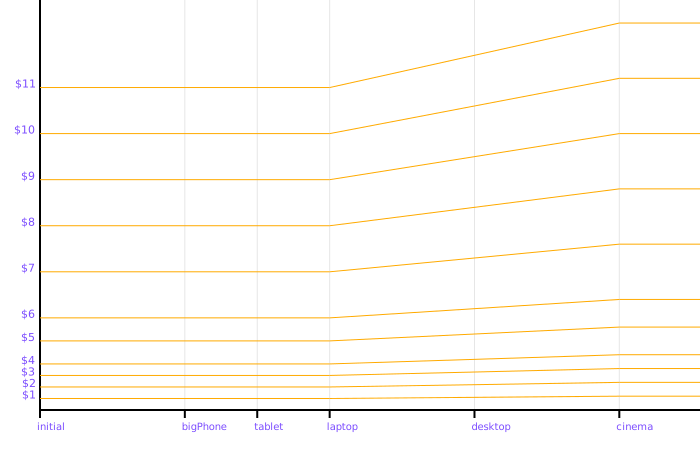
Stitches already provides a space token, but by default it's not responsive. Instead, standard stitches uses a flat list of tokens — the idea being that if you want responsive spacing, you should use media queries to specify a different value for each breakpoint where required.
Not into it!
Instead, our Stitches wrapper in eddev provides a responsive.space section. It can look a little daunting at first:
  responsive: {
    space: {
      1: { "@initial": "4px", "@laptop": ["4px"], "@cinema": "x1.2" },
      2: { "@initial": "8px", "@laptop": ["8px"], "@cinema": "x1.2" },
      3: { "@initial": "12px", "@laptop": ["12px"], "@cinema": "x1.2" },
      4: { "@initial": "16px", "@laptop": ["16px"], "@cinema": "x1.2" },
      5: { "@initial": "24px", "@laptop": ["24px"], "@cinema": "x1.2" },
      6: { "@initial": "32px", "@laptop": ["32px"], "@cinema": "x1.2" },
      7: { "@initial": "48px", "@laptop": ["48px"], "@cinema": "x1.2" },
      8: { "@initial": "64px", "@laptop": ["64px"], "@cinema": "x1.2" },
      9: { "@initial": "80px", "@laptop": ["80px"], "@cinema": "x1.2" },
      10: { "@initial": "96px", "@laptop": ["96px"], "@cinema": "x1.2" },
      11: { "@initial": "112px", "@laptop": ["112px"], "@cinema": "x1.2" },
    },
  },
Luckily, we tend to use the same spacing values for each site — so you wont need to update the laptop and initial values too often.
What's actually happening in that big block of code?
5: { "@initial": "24px", "@laptop": ["24px"], "@cinema": "x1.2" },
@initial — we're using 24px for mobile, bigPhone and tablet breakpoints. We haven't defined specific sizes for bigPhone and tablet, so they're inherited from initial automatically.
@laptop — notice the square brackets?? this indicates that we want to use "CSS Locking" (terrible name), between this breakpoint (the start of laptop), up until the next defined breakpoint (cinema). So, if the user's browser is at the exact size of the laptop, we'll use the value defined in this block, and as the user resizes their browser towards the start of the "cinema" breakpoint, the token will automatically interpolate linearly between the two values.
@cinema — this has been set to x1.2, which means that the value will be calculated as 24px * 1.2, which is 28.8. You'll often need to tweak this number until the designer is happy with the scaling, and typically use the same scale value for typography.
For visual learners, you can see the above spacing table graphed below: